The Shopify metafield strategy that makes your store AI-readable
Metafields are the most underused feature in Shopify, and they happen to be the bridge between your product catalogue and the AI engines deciding which brand to recommend. Here's the metafield setup I use on every store I optimise for AI search.

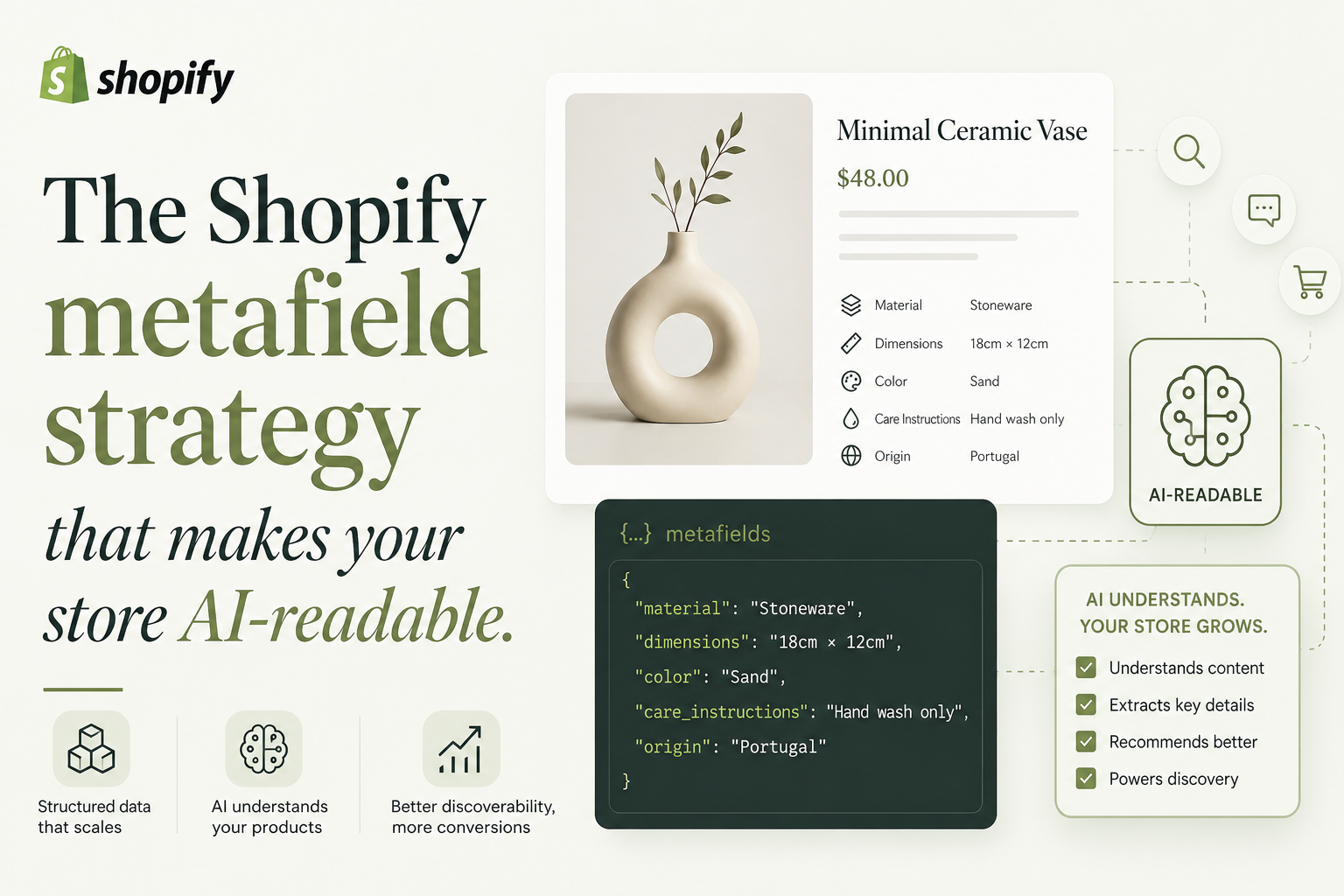
Here's the whole thing in three sentences. Most Shopify stores leave half their product data as prose in the description field, which AI engines have to guess at and frequently get wrong. Metafields are the structured way to express the same data, and once they're wired into your Product schema, the AI can extract attributes directly instead of paraphrasing them. The setup is a one-time job with a six-namespace template that covers what AI engines actually ask about.
The reason metafields matter for AEO
Imagine a customer asking ChatGPT, "Is this olive oil suitable for keto?" The AI looks at your product page. If your product description says "delicious cold-pressed oil from organic Spanish olives, perfect for cooking and salads," the AI guesses. Maybe right. Often wrong.
If your product page emits structured data that says dietaryRestriction: ["keto-friendly"], the AI extracts the answer directly. The difference between guessing and extracting is the difference between sometimes being cited and consistently being cited. [TODO — swap with real story: a client whose product was misclassified by AI before metafields, then correctly classified after]
Metafields are the way Shopify stores express that structured data without resorting to JSON in a Liquid file. They have an editor UI, validation, and they map cleanly to Product schema fields. They're the right tool for the job, and most stores barely use them.
The six-namespace template
I use six metafield namespaces on every store I set up for AEO. The names are stable, the keys are conventional, and the AI engines extract them reliably.
product.attributes — Core physical attributes. Material, weight, dimensions, capacity, finish, colour family, age recommendation. The stuff a buyer would check on the back of a box.
product.use_cases — Tags for what this product is for. "Sensitive skin," "post-workout," "first-time buyer," "gift under 5000." This is the most powerful namespace for AEO because customer questions are use-case shaped, not attribute shaped.
product.compatibility — What the product works with. "Works with iPhone 15," "Compatible with vegan diet," "Designed for sensitive eyes." Compatibility-shaped customer questions are very common in AI search and most stores have nothing here.
product.certifications — Third-party certifications and standards compliance. "FDA approved," "Halal certified," "GMP certified," "GOTS organic." These are high-trust signals the AI weights heavily.
product.ingredients or product.specifications** — Full ingredient list or technical specifications. Even if you display only a curated version, store the full list as a metafield. The AI uses it for "does this contain X" questions.
product.story — Brand story, founder note, sourcing details, manufacturing location. This is the namespace that humanises the product and feeds AI engines on "tell me about this brand" questions.
Not every product needs all six. A footwear product won't have ingredients. A supplement product won't have compatibility. The template is a starting point, not a checklist.
A working Liquid snippet to emit metafields in Product schema
This is the part most metafield posts skip. Defining the metafields is half the work. Wiring them into your Product schema is what makes them visible to AI engines.
Here's the snippet I use, written for Online Store 2.0 themes. Drop it into snippets/product-schema.liquid and {% render 'product-schema', product: product %} from your product template.
{%- liquid
  assign product_url = shop.url | append: product.url
  assign main_image = product.featured_image | image_url: width: 1200
  assign brand_value = product.vendor
  assign use_cases = product.metafields.product.use_cases.value
  assign attributes = product.metafields.product.attributes.value
  assign certs = product.metafields.product.certifications.value
-%}
<script type="application/ld+json">
{
  "@context": "https://schema.org",
  "@type": "Product",
  "@id": "{{ product_url }}#product",
  "name": {{ product.title | json }},
  "description": {{ product.description | strip_html | truncate: 500 | json }},
  "image": "https:{{ main_image }}",
  "sku": {{ product.selected_or_first_available_variant.sku | json }},
  "brand": {
    "@type": "Brand",
    "name": {{ brand_value | json }}
  },
  "offers": {
    "@type": "Offer",
    "url": "{{ product_url }}",
    "price": "{{ product.selected_or_first_available_variant.price | money_without_currency | replace: ',', '' }}",
    "priceCurrency": "{{ cart.currency.iso_code }}",
    "availability": "{% if product.available %}https://schema.org/InStock{% else %}https://schema.org/OutOfStock{% endif %}"
  }{% if use_cases %},
  "audience": {
    "@type": "PeopleAudience",
    "suggestedUseFor": {{ use_cases | json }}
  }{% endif %}{% if attributes %},
  "additionalProperty": [
    {%- for attr in attributes -%}
      { "@type": "PropertyValue", "name": {{ attr.key | json }}, "value": {{ attr.value | json }} }{% unless forloop.last %},{% endunless %}
    {%- endfor -%}
  ]{% endif %}{% if certs %},
  "isFamilyFriendly": true,
  "hasCertification": {{ certs | json }}{% endif %}
}
</script>
Two things are worth noticing. The additionalProperty array is where you emit physical attributes that don't map to a named Product field. audience.suggestedUseFor is the field most stores miss — it's where the use-case tags go, and it's the field AI engines extract for "is this for X" questions.
What this looks like to an AI engine
Once you emit the schema above with populated metafields, the AI looking at your product page can answer directly. "Is this olive oil keto-friendly?" Yes, says the audience.suggestedUseFor. "Does this have palm oil?" No, says the ingredients metafield. "Is it certified organic?" Yes, says hasCertification.
Compare that to a description-only page where the AI has to infer all of this from prose. The inference is often correct. The inference is sometimes wrong. The structured extraction is never wrong because the data is the data.
The compound effect across hundreds of customer questions is that your products show up as the answer to specific questions in a way that description-only products do not. [TODO — swap with real story: a specific product whose AI visibility changed after metafields]
Getting your team to populate them
The hardest part of metafield strategy is not technical. It's getting whoever runs your product uploads to enter the data consistently.
Three things help.
Set definitions with strict types. Single-line text fields drift. Choose lists, dates, and structured types where possible. The editor can't enter junk if the field doesn't accept it.
Make the editor view tidy. Group metafields by namespace in Shopify admin. Hide ones that don't apply to a given product type using validations. The fewer fields the editor sees per product, the more reliably they fill them.
Make the missing-field cost visible. Set up a Shopify Flow or a manual report that lists products without their key metafields populated. Send it to whoever uploads products. The pattern of "you didn't fill X for last week's launches" gets the data populated reliably.
What to skip
A metafield for every conceivable attribute. You'll never populate them. Start with the six namespaces above and add when you discover a customer question your data doesn't answer.
A metafield strategy without wiring it into schema. Storing data is half the work. If your theme isn't emitting the metafields as structured data, the AI can't read them and the work is wasted.
A metafield migration for a store about to replatform. If you're moving off Shopify in the next six months, do nothing here. Build the structured data on the new platform.
What this enables, once it's in place
The store starts getting cited for specific category questions in Perplexity. The same questions move into Google AI Overviews over a few weeks. ChatGPT's responses start naming the brand more often when asked about your specific niche.
The compound effect is that your product detail pages stop being just commerce pages and become the canonical source of structured data about each product. Other AI engines, comparison sites, and review aggregators all start reading from the same well. The work compounds.
If you want me to set up the metafield strategy on your store, send me your URL and I'll scope the work. Most stores can be done in a week with one developer pair plus a content editor.
Sources:
FAQ
Frequently asked questions
What are Shopify metafields?
Metafields are custom fields you add to Shopify resources like products, collections, customers, and orders to store structured data that does not fit in the default fields. They were introduced as a developer feature and became central to Online Store 2.0 because they power dynamic content sources in themes.How do metafields help with AEO and AI search?
Metafields let you store structured product attributes like material, use-case, size range, dietary tags, or compatibility notes that AI engines can read directly when emitted as Product schema. Without metafields, those attributes live in product descriptions as prose, and the AI has to infer them, which it often gets wrong.What metafields should every D2C Shopify store have?
At minimum, brand, GTIN or SKU normalised, material or ingredient list, use-case tags, size or capacity, and dietary or allergen information if applicable. These six categories cover what AI engines most commonly ask about in customer questions, and they make your product schema rich enough to be cited as an answer.Can I set up metafields without a developer?
Yes for definition and basic use. Go to Settings, Custom data, then Products to create metafield definitions. You can set the namespace, key, type, and validation rules without code. Where you need a developer is wiring the metafields into your theme's Product schema output if your theme does not handle this automatically.Are metafields included in Shopify's default Product schema?
Not automatically. Default themes emit a Product block with name, price, image, and availability. Adding metafields to the schema requires editing the snippet that builds the JSON-LD, usually product-schema.liquid or equivalent. The metafield API is exposed in Liquid via product.metafields.How many metafields can a Shopify product have?
Shopify allows a large number of metafields per product, well into the thousands per resource. The practical limit is what is useful. Most stores need five to fifteen metafields per product to capture the attributes that matter for AEO and customer-facing display.Does the Shopify metafield strategy work on Online Store 1.0?
Partially. Metafields exist on 1.0, but the dynamic-source machinery that makes them easy to use in the theme editor is a 2.0 feature. The Liquid API is the same, so a developer can wire them up on 1.0, but the editor experience and the cost-to-iterate are noticeably worse than on 2.0.Will metafields slow down my Shopify store?
No, in practice. Metafields are fetched alongside the product object and add negligible overhead. The cost is the developer time to set them up cleanly and the editor time to populate them. Once populated, they are basically free to render.
Revision history· 1 entry
June 18, 2026
Initial post. Includes the six-namespace metafield strategy plus a working product-schema Liquid snippet that emits them.
Last updated June 18, 2026